
About Rettix
Rettix is a module that allows you to add a button to the order list, enabling the customer to start the withdrawal from contract / return request process.
The module uses standard PrestaShop return mechanisms. This means that submitted returns are added to the standard return list in the back office and can then be handled by the shop in the same way as returns created through the default PrestaShop form.
The module has been designed to also work for orders placed by guests. Access to the return form is provided through a link containing the order identifier and the secure order key.
The module can also block returns of virtual products, products that were actually customized by the customer, and orders where a VAT number was provided in the invoice address. It can also hide native PrestaShop return controls and provide access to return history even after the return period has expired.
Installation
- Log in to the PrestaShop back office.
- Go to the Modules section.
- Click the "Upload a module" button.
- Select and upload the gmrettix.zip file.
- Install the module.
- After installation, go to the module configuration.

Configuration
The module configuration contains options that allow you to define when an order should be considered returnable.
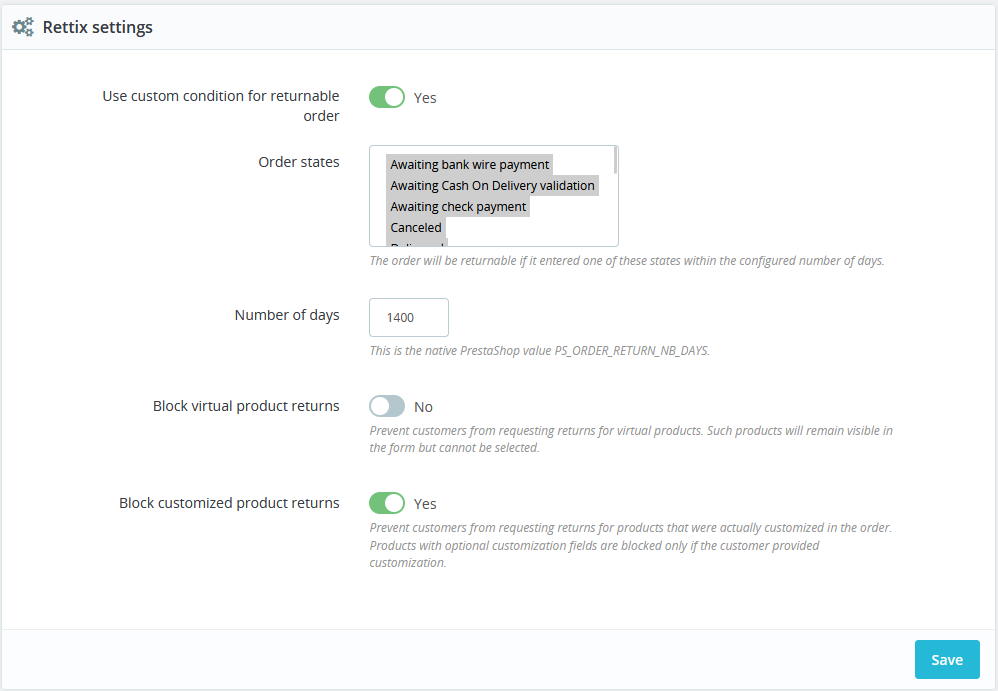
Use custom return condition
Enables the module's custom condition that defines when an order can be returned.
If this option is disabled, the module uses the default PrestaShop method
Order::isReturnable()
.
Order states
A list of order states that should be taken into account by the custom return condition.
If the custom condition is enabled, the order will be considered returnable if it received one of the selected states in its order history within the configured time period.
The order does not have to currently be in that state.
Number of days
The number of days for which an order can be considered returnable.
This option uses the native PrestaShop variable
PS_ORDER_RETURN_NB_DAYS
.
This means it is the same value that PrestaShop uses for the standard return period.
Block returns for orders with VAT number in invoice address
Prevents customers from requesting returns for orders where the invoice address contains a VAT number.
This condition works independently of the custom return condition.
If enabled, the order will not be considered returnable even if it matches the default PrestaShop return condition or the custom order-state-based condition.
Block virtual product returns
Prevents customers from requesting returns for virtual products.
Such products remain visible in the return form so the customer can still see the full order contents, but they cannot be selected for return.
Block customized product returns
Prevents customers from requesting returns for products that were actually customized by the customer.
The module does not block products merely because they contain optional customization fields. A product is blocked only if the customer provided customization data when placing the order.
Hide default PrestaShop return controls
Hides the native PrestaShop return checkboxes, quantity selectors and return request form while keeping product and order information visible.
This option is useful when you want customers to use only the Rettix return form while still displaying the standard PrestaShop order information.
Example of how the custom condition works:
- the Use custom return condition option is enabled,
- selected states: "Shipped" and "Delivered",
- number of days: 14.
With this configuration, the order will be returnable if it received the "Shipped" or "Delivered" status within the last 14 days. The module checks the order history and selects the latest occurrence of one of the configured states.
Button placement in the template
The module uses its own hook:
{hook h='displayRettix' order=$order}The code should be inserted in the place where the button should appear:
Withdraw from contract (return)
Most often, this will be the template responsible for the customer's or guest's order list.
PrestaShop 1.7 / 8 / 9
- Connect to the server via FTP or edit the theme files through your project repository.
- Go to the directory:
/themes/THEME_NAME/templates/customer/-
Open the file responsible for the order history, most commonly
history.tpl
- Insert the hook code next to the buttons available for a given order, for example next to the order details button or the reorder button. This should be done in two places (separately for the desktop and mobile views):
{hook h='displayRettix' order=$order}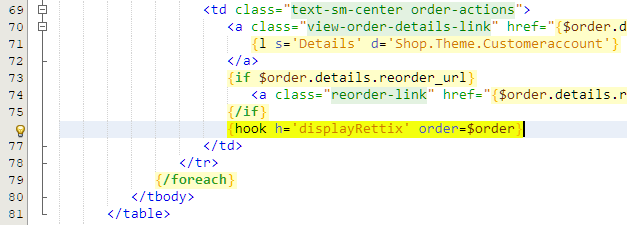
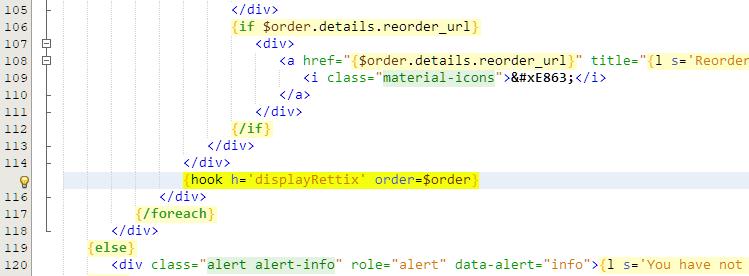
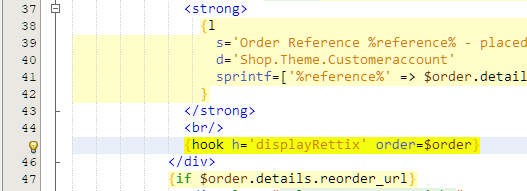
You can also add the button to the order details page
order-detail.tpl
in the same way.
Module behavior
Button display
The button is displayed when the order meets the return conditions.
If the return period has already expired but the order contains previously submitted return requests, the button remains visible. In this case its label changes from "Withdraw from contract (return)" to "Return history" , allowing the customer to access the return history even though no new return requests can be submitted.
By default, the module uses the PrestaShop condition, which determines that an order is returnable if it has a state marked as shipped and paid for the configured number of days. However, this may not suit every shop, which is why the module allows this condition to be switched to a custom one.
If the custom condition option is enabled, the module checks the order state history and compares it with the module configuration. If the order has one of the states selected in the configuration and that state was assigned no later than the configured number of days ago, the order is considered returnable.
VAT number in invoice address
The module can block return requests for orders where a VAT number was provided in the invoice address.
This option works independently of the custom return condition. It means that the VAT number check is applied even when the module uses the default PrestaShop return condition.
If this option is enabled and the invoice address contains a VAT number, the order is not considered returnable. In most cases, the return button will not be displayed for such an order.
If the option is enabled after a return request has already been created for an order, the return page may still be available as a return history page. In that case, the customer will see a message explaining that returns are not available for this order because a VAT number was provided in the invoice address.
Withdrawal from contract / return form
After clicking the button, the customer is taken to the module form. The form displays the products from the order and quantity information.
If the return period has expired, the form remains accessible so that the customer can review previously submitted return requests. In such cases a warning message is displayed and all controls used to create a new return request are disabled.
If a product has already been fully requested for return, it remains visible in the table, but it cannot be selected for return again. Instead of the quantity selection field, a message is displayed indicating that the product has already been requested for return.
If the option to block virtual products is enabled, virtual products remain visible in the table but cannot be selected for return. An appropriate message is displayed instead of the quantity selector.
If the option to block customized products is enabled, products that were actually customized by the customer also remain visible in the table but cannot be selected for return. Products with optional customization fields are blocked only if customization data was provided when the order was placed.
If the option to block returns for orders with a VAT number in the invoice address is enabled, the entire order becomes unavailable for return. This is an order-level restriction, not a product-level restriction.
If previous return requests exist for the order, an additional section is displayed below the form showing the complete return history. Each return request is presented separately together with its return number, current status, submission date, customer message and the list of returned products with quantities.
Return reason
The form contains a message field, but it is not required. The customer can submit a withdrawal from contract / return request without providing a reason.
Handling the submitted return
After the form is submitted, the module creates a standard PrestaShop return. The return is visible in the back office in the section dedicated to handling returns.
Further handling is done using the standard PrestaShop workflow:
- reviewing the request,
- changing the return status,
- possibly refusing the return,
- email communication according to PrestaShop mechanisms,
- further warehouse or accounting actions.
Email notifications
To allow the shop to receive notifications about new return requests, this option must be enabled in the MailAlerts module.
Additionally, the Rettix module forwards the email sent by the MailAlerts module to the customer and supplements it with the return request date.
Guest access
The module does not require the customer to log in to an account. Access to the form is based on the order identifier and the secure order key. This allows the form to also be available for orders placed as a guest.
The same mechanism is also used when displaying historical return requests. Guests can review previously submitted returns using the secure link generated by the module without creating a customer account.
The VAT number restriction is applied independently of the custom return condition and can block returns even when the order matches other return rules.