
About Tidy
Tidy is a PrestaShop module designed to help keep your store data clean. It lets you run cleaning operations manually, preview the results before executing them, and automate selected tasks with CRON.
Installation
- Sign in to your PrestaShop Back Office.
- Open Modules.
- Choose the option to upload a new module.
- Select the
tidy.ziparchive and upload it. - Install the module and open its configuration page.
Using the module
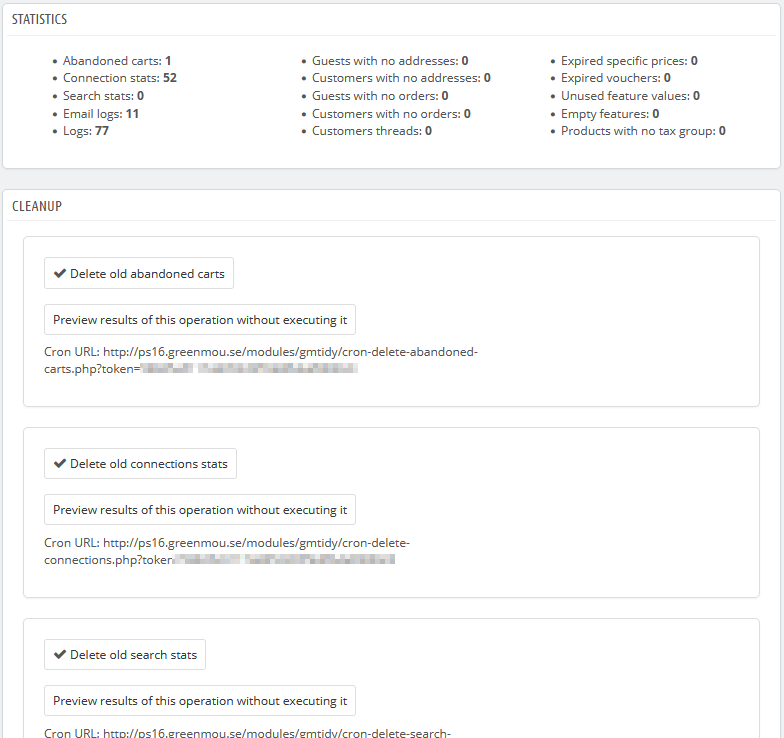
After installation you will see a set of buttons. Each button executes its associated cleaning or optimization operation.
Preview
To review the results without executing the actual cleaning or optimization operation, click the Preview button.
Scheduling tasks with CRON
Below each operation button you will find a link that can execute the operation automatically. You can use PrestaShop's built-in CRON module, but the original documentation recommends creating a server-side CRON task with your hosting administrator.
CRON URLs may trigger data deletion. Keep them private and never share your actual task URLs in public documentation.
Settings
Number of days
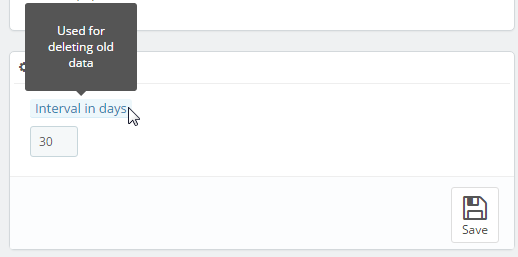
This setting controls which data qualifies as old enough to delete. Only records older than the specified number of days are deleted.
To override the global value for a specific operation, add &days=X to its CRON URL. For example, &days=10 makes that operation delete records older than ten days.
Advanced parameters
Unused image cleanup timeout
A timeout may occur while reading the entire img/p/ directory tree. You can restrict the scan to a part of that tree by adding &sub=X to the related CRON URL.
&sub=1— processimg/p/1/.&sub=1/1— processimg/p/1/1/and its subdirectories.
Silent mode for CRON
If you do not need detailed text output, add the &silent parameter to the CRON URL. As documented in the original guide, the task will return only OK or Error.