
GaPSeR – GPSR Module for PrestaShop

GaPSeR – GPSR Module for PrestaShop | GreenMouse

Keep GPSR information organized on your product pages. GaPSeR lets you display manufacturer and supplier details, shared safety warnings and product-specific information. Save time with bulk assignments and CSV imports.

Module version
1.6.5
Last update
12.12.2025
PrestaShop compatibility
1.6.x 1.7.x 8.x 9.x
ThirtyBees compatibility
Yes
Supported PHP version
7.x 8.0 8.1 8.2 8.3 8.4 8.5
Multistore compatible
Yes
License
1 PrestaShop installation
Support and updates
12 months
Installation difficulty
Simple
$39.00 tax excl.
($47.97 tax incl.)
The store address to which the license will be assigned.
VAT invoice for every order
Sent by email after payment has been received
Documentation
Product safety information • GPSR

GPSR information on product pages. Manage it in one place, with less manual work.

Manufacturer details, safety information and warnings should be easy for shoppers to find. With a large catalog, repeating the same content across dozens of product descriptions takes time and makes updates harder.

GaPSeR lets you prepare GPSR information for manufacturers, suppliers, product groups and individual items, then display it in a dedicated section on each product page.

The result: better-organized safety information, less repetitive editing and an easier way to keep product details up to date.

01 / Shared product information

Enter manufacturer information once — use it across multiple product pages

The module adds a “GPSR Information” field to the manufacturer (brand) editing form. Content entered for a manufacturer can automatically appear on the pages of all products associated with that manufacturer.

You can also display the brand name and logo, along with information entered for the product's default supplier or all its suppliers, depending on your settings.

The content is multilingual, so you can provide appropriate information to customers browsing your store in different languages.

One update, multiple pages

No need to copy the same information into each individual product description.

02 / Warnings and safety labels

Assign shared warnings to entire groups of products

Some products need additional warnings, for example about flammability, age restrictions or the need for special care. GaPSeR organizes these warnings using dedicated, disabled GPSR categories.

You can add warning text, a safety symbol image, or both to a category. Once a product is assigned to that category, its content appears in the GPSR information section on the product page.

You can control the order in which warnings are displayed by adjusting the order of their corresponding categories.

Consistent warnings

One warning can be reused across every product that requires the same safety notice.

03 / Bulk operations

Assign manufacturers and warnings without opening each product individually

GaPSeR includes panels for bulk-assigning manufacturers and warning categories. Search for relevant products, select the items you need and apply changes to the whole group.

Search can take into account product names, descriptions, features and categories, as well as manufacturers when assigning warnings. An additional panel shows how many products have no manufacturer assigned and lets you export their list to CSV.

This is particularly useful for organizing an existing catalog and preparing your store to present product safety information.

Fewer repetitive clicks

Apply the same assignments to multiple products instead of editing them one by one.

04 / CSV import

Import prepared GPSR information from a file

Already have safety details in a spreadsheet provided by a manufacturer or supplier? You don't need to enter every row manually in the store's administration panel.

The import panel accepts UTF-8 CSV files and lets you select the data language, identifier column, description column and separator. The module matches products using the selected identifier and populates their GPSR fields. Manufacturer information can also be imported.

When needed, product matching can also use identifiers assigned to product combinations.

Work with existing data

Prepare or organize your information in a spreadsheet, then import it into your store.

05 / Product page display

Show safety information in a clear, dedicated section

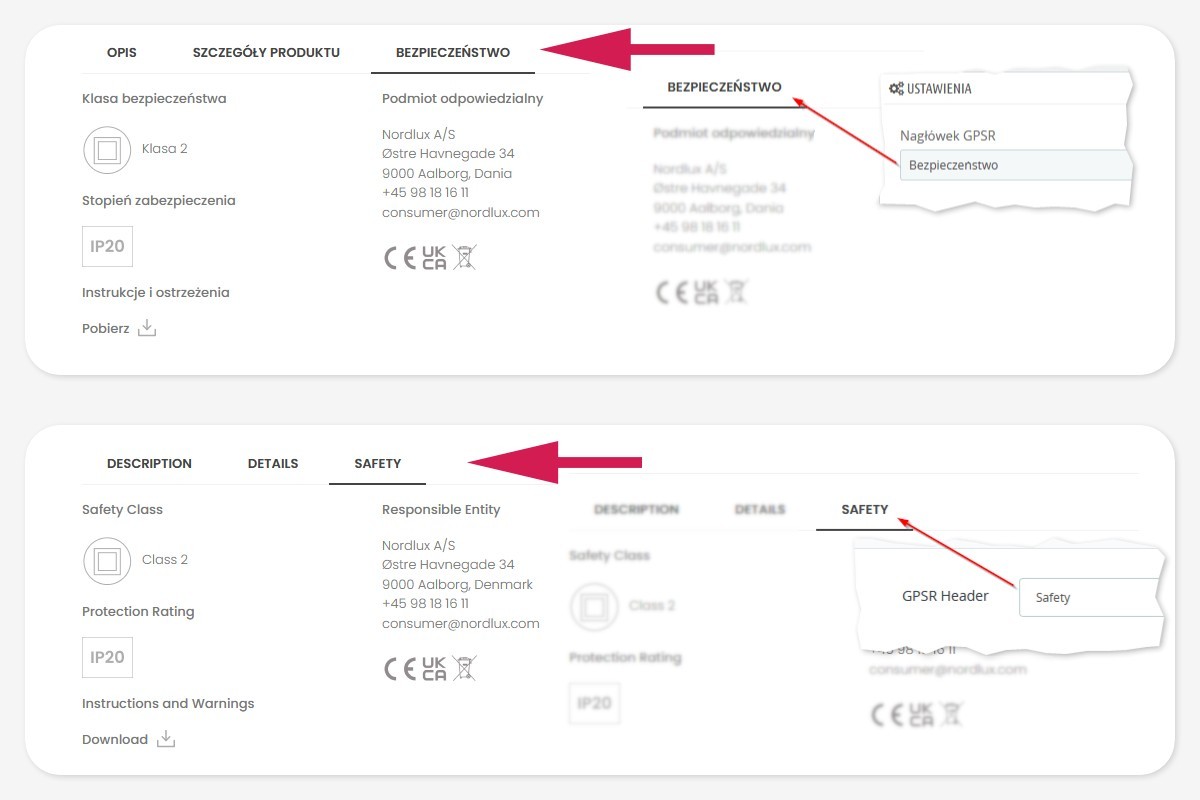
GaPSeR brings together available GPSR information from the manufacturer, suppliers, product and assigned categories in one block on the product page. You can display it as an additional tab or place it elsewhere in the theme.

You can customize the section heading, enable manufacturer names and logos, and choose how the logo is displayed. You can also change the block's position using available hooks or the widget.

This keeps important safety details separate from the product's main sales description.

Fits your storefront

Choose how safety details are displayed without rewriting the entire product description.

06 / Individual information and attachments

Add product-specific instructions and documents where needed

Not every piece of information can be shared across a group of products. The module provides an additional “GPSR Information” field for individual products, so you can include product-specific notes or instructions.

You can also add links to attachments, such as PDF instructions, within the GPSR content using the text editor and PrestaShop's file manager.

Beyond shared templates

Add details for individual products whenever shared manufacturer information isn't enough.

Features

What exactly does GaPSeR offer?

GPSR information sources

Multilingual fields for manufacturers, suppliers and products; optional manufacturer name and logo display; shared warnings and safety labels based on dedicated categories.

Catalog management

Bulk assignment of manufacturers and warning categories; search and selection of product groups; list of products without an assigned manufacturer and CSV export.

Import and display

CSV import of product and manufacturer GPSR descriptions; language and import column selection; additional product tab or dedicated section; configurable heading, hooks and widget; ability to include links to instructions and other attachments.

Use cases

Where does GaPSeR save the most time?

Large catalogs

Avoid repeating the same information across hundreds of product pages.

Multiple brands and suppliers

Keep shared information with the relevant manufacturer or supplier.

Products requiring warnings

Manage shared safety labels and notices through GPSR categories.

Multilingual stores

Prepare GPSR information for customers shopping in different languages.

FAQ

Frequently asked questions

No. The module helps organize and display product safety information. The accuracy, completeness and currency of the required details, along with other legal obligations, must be verified separately.

No. Information stored with a manufacturer or supplier can be reused on the pages of associated products. Additional warnings can also be assigned to entire product groups.

Create a dedicated GPSR category, add warning text or an image, and assign the relevant products to it. The built-in panel lets you do this in bulk.

Yes. A dedicated panel shows how many products are missing a manufacturer and lets you export a list to CSV. A bulk manufacturer assignment panel is also available.

Yes. Import supports both product and manufacturer descriptions. You select the file, language, identifier, relevant columns and separator.

Yes. You can add a link to the document in the GPSR field's text editor using PrestaShop's file manager.

No. You can also display the section elsewhere on the product page using hooks or the widget. Its placement depends on your theme's structure.
Organized GPSR information

Manage product safety information without repetitive editing

Use shared manufacturer details, bulk warning assignments and CSV imports to create clear GPSR information sections on your product pages.