Returns and withdrawal from the contract • PrestaShop
Make return requests easier for customers. Manage them in your familiar PrestaShop back office.
A customer wants to return an item but has to find the right form, log in to an account, or explain their decision. These are unnecessary steps for the buyer and additional questions and manual work for your store.
Rettix adds a button to the order history or order details page that takes the customer straight to a withdrawal / return request form. The form also works for guest orders, does not require a reason, and lets customers request a return for all or part of an order.
The result: a simpler process for buyers, clearer return handling, and requests managed through PrestaShop's standard return system.
01 / Easy return requests
No searching for a form — just a button next to the order
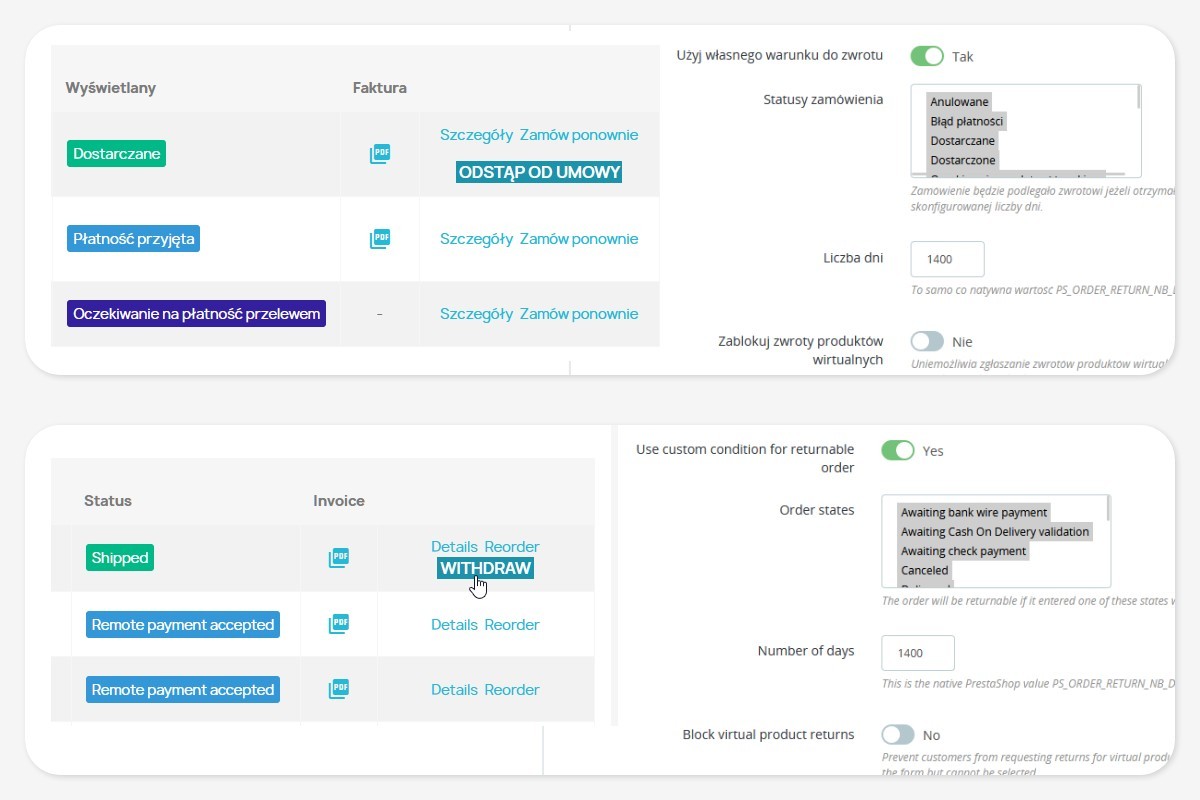
Rettix lets you place a “Withdraw from contract (return)” button in the order history or on the order details page. After clicking it, the customer sees the ordered items and can select which products and quantities to return.
The message field is optional — customers can submit a request without stating a reason.
Fewer obstacles
A short, straightforward request process instead of extra instructions and emails.
Accept return requests even when the buyer has no account
The form is available to registered customers and guest buyers. Guest access uses the order identifier and its secure key, without requiring account registration.
Guests can also use this access to review the history of their return requests later.
03 / Native return workflow
A new form for customers. The familiar workflow for your team.
Rettix does not create a separate RMA system. Requests appear in PrestaShop's standard merchandise returns list, where your team can review them, update their status, and continue processing them.
The module works with MailAlerts: when notifications are configured, it adds the return request date to the message sent to the customer.
You can also hide PrestaShop's default return controls while keeping the order information visible, so customers have one consistent return process.
04 / Rules and exceptions
Decide when return requests are available and which products qualify
You can use PrestaShop's default condition or set your own condition based on the order status history. Choose which statuses qualify an order and set the availability period using PrestaShop's return-days setting.
Optionally, the module can prevent the selection of virtual products and products that have actually been customized. A product with an optional customization field is not excluded automatically — the customer must have entered customization data.
There is also a technical option to block requests for orders with a tax identification number in the invoice address. This works independently of the other conditions. It should be configured in line with applicable law and your store's sales terms — a tax ID alone does not determine the buyer's statutory rights.
Excluded items remain visible in the order summary but cannot be selected for return.
05 / Return request history
Customers can review previous returns even after the return period expires
Rettix displays previous requests with their number, status, date, customer message, and list of products and quantities. An item already included in a previous request in its full quantity cannot be selected for return again.
Once the return period has expired, if previous requests exist, the button becomes “Return history”. Customers can still review their cases but cannot create a new request.
06 / Theme integration
Place the button where customers look for their order information
The module provides the displayRettix hook. To display the button in your preferred location, add the hook call to the theme template, such as history.tpl or order-detail.tpl. In the order history, desktop and mobile views usually need to be handled separately.
Rettix also uses a small override of the Order class. After installation or an update, you may need to clear the cache and check compatibility with other store customizations.
Technical specificationsWhat does Rettix include?
How it works
Uses PrestaShop's native returns system; request form for registered customers and guests; full and partial order returns; return request history.
Configuration
Custom conditions based on order statuses; return period taken from PS_ORDER_RETURN_NB_DAYS; exclusions for virtual and customized products; optional tax ID restriction; option to hide PrestaShop's default return controls.
Implementation requirements
Add {hook h='displayRettix' order=$order} to the template; verify the Order class override; configure MailAlerts if return request notification emails are required.
Who is it for?When is Rettix especially useful?
Guest checkout
Offer return requests to shoppers who placed orders without registering.
Stores handling frequent returns
Keep requests organized in PrestaShop's native return workflow.
Mixed product catalogs
Configure exclusions for virtual and customized products.
Different fulfillment stages
Link return request availability to selected order statuses.
FAQFrequently asked questions
No. The form also works for guest orders using a secure order identifier and order key.
No. The message field is optional.
No. Requests are created in PrestaShop's standard returns system and managed through its back office.
Yes. Customers can select specific products and quantities, provided they are eligible for return.
To show the button in the desired location in the order history or order details, add the displayRettix hook to the template. The module also uses an Order class override, so verify that it is applied correctly after installation.
No. Rettix simplifies the technical return request process, but it does not determine customers' legal rights. Return periods and exclusions must be configured in accordance with applicable law and your store's terms and conditions.
Easier returns in PrestaShopSimplify return requests without changing how you manage returns
Give registered customers and guests a straightforward form, while handling all requests in the standard PrestaShop back office.